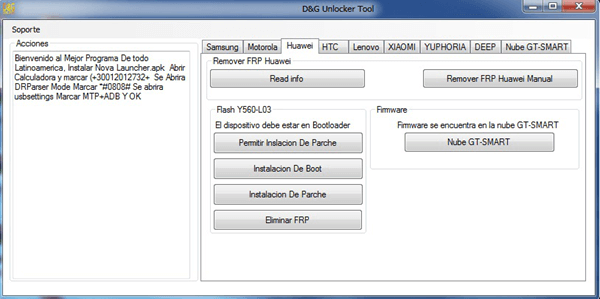
Yes, there are several free FRP bypass tools available that you can use for bypassing security protocols on your android device. Some of the popular choices include Pangu FRP Bypass, FRP Bypass Resolutions, SideSync, All Samsung FRP Hijacker, GSM Flasher ADB Bypasser FRP Tool, etc.
What is the free tool to unlock FRP?
iMyFone Lockwiper (Android) is a powerful FRP bypass tool that can remove FRP locks on Android without Google password. It supports a wide range of brands and models, including Samsung, Xiaomi, Redmi, etc. The tool is user-friendly and provides detailed simple steps to guide you to finish the FRP bypass process.
What is the best free Frp bypass tool with PC?
DroidKit is a powerful FRP bypass tool for Windows and Mac users. If you’re locked out of your Android device because of FRP and can’t remember your Google account, DroidKit offers an easy fix. It works with many Android devices, like Samsung, Xiaomi, and OPPO, making it a great choice for quick access.
Is the Samsung FRP tool free?
Easy Samsung FRP Tool is a free and easy tool that can bypass FRP on Samsung devices. It can launch the web browser on the FRP locked Samsung device via meta mode and allow you to sign in with a new Google account. It supports most Samsung models and versions and has a simple and user-friendly interface.
Is there a free alternative to DroidKit FRP?
Part 2. Best Droidkit Alternative to Remove Android FRP Lock. If you are looking for DroidKit alternative, we recommend iMyFone LockWiper (Android) as the best one. This is a Windows-based software that will assist you in removing FRP as well as all screen locks from your Android device.
What is the free program that removes FRP and Google accounts?
GSM Flasher ADB Bypass FRP Tool helps in removing the Google FRP lock on your android smart device by using the ADB (Android Debug Bridge) mode. By using ADB, it lets you communicate with your device and perform multiple functions like installing apps or debugging the device.
Is it possible to remove Google FRP lock?
Yes, it is possible to remove Google lock, also known as Factory Reset Protection (FRP) lock, from a device. You can use LockWiper(Android) to bypass Google lock on Android devices, even if you don’t have password.
Do FRP bypass tools work?
Yes, it is possible to remove the Google FRP lock in some cases. However, the methods vary depending on the device model and Android version. It’s important to note that bypassing FRP may violate Google’s terms of service and could potentially harm your device.
Does Odin remove the FRP lock?
Odin is an advanced mobile phone software that can easily unlock Samsung mobile devices by bypassing Factory Reset Protection (FRP). Odin FRP bypass flashes smartphones with a custom ROM, which, in turn, will update its system accessibility.
What is an easy FRP bypass?
FRP (Factory Reset Protection) is a security feature that is designed to prevent unauthorized access to a device after it has been reset to its factory settings. It is a feature that is commonly found in Android devices. FRP unlock is the process of removing this security feature from an Android device.
How do I access Samsung free?
Go to the Home screen. To open the menu, swipe up on the screen. Choose Samsung Free.
Can I get DroidKit for free?
Get the latest version If you have an Android device and have run into some problems with it, download DroidKit for free and resolve these issues quickly and easily, without the need for advanced technical knowledge.
What is the best tool for FRP?
When it comes to bypassing FRP locks, Tenorshare Samsung FRP Tool truly shines as the best FRP bypass tool for PC. It effortlessly bypasses Google FRP on many devices without breaking a sweat, like Samsung, Xiaomi, Redmi, Vivo, OPPO, Realme, Oneplus, Huawei and Motorola.
Is DroidKit safe and free?
DroidKit is safe software. It promises that it won’t leak any of your information and data. Does DroidKit erase all data? If you use functions like Screen Unlocker, FRP Bypass, etc., DroidKit will erase all data on your Android.
Is the GSM flasher tool free?
GSM FRP Tool works with all Android versions, from Android 5.0 to 12.0. It’s absolutely free to download.
Do FRP bypass tools work?
Yes, it is possible to remove the Google FRP lock in some cases. However, the methods vary depending on the device model and Android version. It’s important to note that bypassing FRP may violate Google’s terms of service and could potentially harm your device.
Is pangu FRP bypass free?
Pangu FRP bypass tool is free and works on older Android versions.
Does flashing firmware remove FRP?
FRP is a security feature that is designed to prevent unauthorized users from accessing your device after it has been factory reset. Can flash remove FRP? Yes, flashing can remove FRP. However, it is important to note that flashing your device can be dangerous and can brick your device if it is not done correctly.
Does factory reset remove FRP?
In this case, the FRP will prevent anyone from restoring the device without entering the Google account password (password of any Google account previously signed in with will be sufficient) or without entering the PIN in case set by the user as well. Even a recovery mode factory reset will not do the job.
Is FRP bypass permanent?
Most methods available for bypassing the FRP lock are temporary and might not provide a long-term solution. These methods often involve using third-party tools or software that exploit vulnerabilities in the Android operating system.
Is FRP bypass legal?
It is important to remember that bypassing FRP may have legal implications, and it should only be done on devices that you own or have proper authorization for.
What is the FRP code?
Factory Reset Protection (FRP), is a security feature on Android devices with Android OS Version 5.1 (Lollipop) and higher. The FRP provides a built-in security feature you are able to use that protects your device and information, including screen locks and data encryptions.
Is it possible to unlock FRP lock?
Some phones allow resetting the FRP lock by wiping data through recovery mode. The steps may vary by model but generally involve: Booting into recovery mode by holding Power + Volume Up/Down. Navigating to Wipe data/Factory reset option using volume keys.
Can I flash Odin without unlocking bootloader?
No, you can’t do that. When you have not unlocked the bootloader the android system will not accept the files being flashed using Odin.
How do I turn off FRP lock?
How to Turn Off Factory Reset Protection on Android. Factory Reset Protection will be automatically set up once you add a Google account on your Android phone. If you want to turn off FRP, you need to remove all Google accounts you used on your smartphone before resetting the system to the factory settings.
Does Odin mode delete files?
None of your internal storage files i.e. Photos, Music, Videos, Docs etc., will not be removed until you do a repartition of the device using Odin. Your phone will be restored to perfect condition; just that all your personal information will be gone such as contacts that were on the phone storage and apps.